
In the previous two steps of the NIST Cybersecurity Framework, identify and protect, we explained how to identify cybersecurity risks, map your environment, gain insight into vulnerabilities, and implement protective measures. What else is needed for optimal protection? Monitoring these security measures and detecting cybersecurity incidents in a timely manner. Within the NIST Cybersecurity Framework, we call this phase 'detect'.
We provided an introduction to the NIST Cybersecurity Framework in a previous article. You can read it here.

IDENTIFYING CYBERSECURITY INCIDENTS
Every year, many companies are hacked or experience a data breach. On average, hackers have free rein for about 297 days before these hacks and breaches are discovered, if they are discovered at all. Even companies that spend thousands of euros on digital security have no idea if a hacker is currently present on their network. 'Detect' is all about implementing and developing measures to identify a cybersecurity incident (and thus hackers) in a timely manner.
"When a new house is built, items that warn you of threats are often installed immediately. Think of smoke detectors, alarm systems, and carbon monoxide detectors. The analogy of building a house can be seen as the detect function."
HOW DO YOU IDENTIFY A CYBERSECURITY INCIDENT?
There are a number of interesting things you can monitor to identify a cybersecurity incident in a timely manner:
1. Identify and interpret: suspicious traffic within and to your Cloud and the behavior of your Cloud users.
2. Monitor: your Cloud based on network traffic, service providers, users, and activities.
3. Processes and procedures: establish these to be able to respond should suspicious activity occur in your Cloud.
HONEYPOT
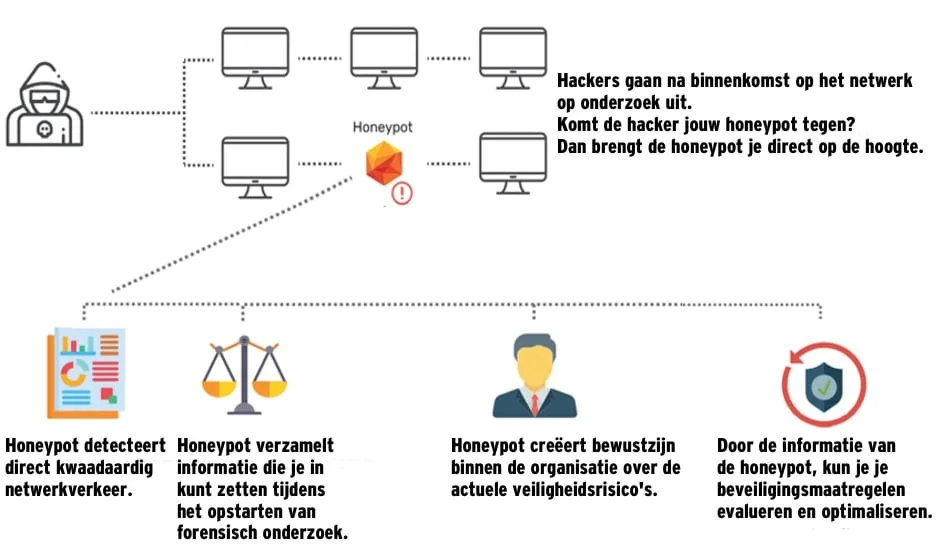
Fundaments offers a honeypot solution for this. Our honeypot is a VM in your network that poses as a legitimate part of your Cloud environment. Think of an AD server, database, or network component, for example. The honeypot can be configured to fit seamlessly into your Cloud environment's setup. After setting up the honeypot, you simply wait for it to detect an attacker or malware. There is no room for doubt. When the honeypot detects malicious network traffic, it is always traffic that has no business being on the honeypot. You are notified immediately upon detection.
This looks as follows:
Would you like to know more about our honeypot solution? Please contact us by calling 088 4 227 227 or emailing info@fundaments.nl.
